
NOTE
4.2 Redis Sentinel
1. Why Redis Sentinel is needed - Primary-replica replication cannot perform automatic failover 2. What Redis Sentinel is - Redis's high-availability mechanism, solving the lack of automatic failover in primary-replica replication 2.1. Redis Sentinel functions - Monitoring, Notification, Automatic failover, Configuration provider
This is a historical learning note and may contain outdated or incomplete understanding.
1. Why Redis Sentinel Is Needed
- Primary-replica replication cannot perform automatic failover.
2. What Is Redis Sentinel?
- Redis’s high-availability mechanism, solving the problem that primary-replica replication cannot perform automatic failover.
2.1. Redis Sentinel Functions
- Monitoring: continuously checks whether the master or replica is working.
- Notification: reports Redis instance errors through an API.
- Automatic failover: if the master fails, a replica is promoted to master. When clients connect, they are redirected to the new address.
- Configuration provider: clients connect to Sentinel, and Sentinel tells them the address of the master.
2.2. Redis Sentinel Topology
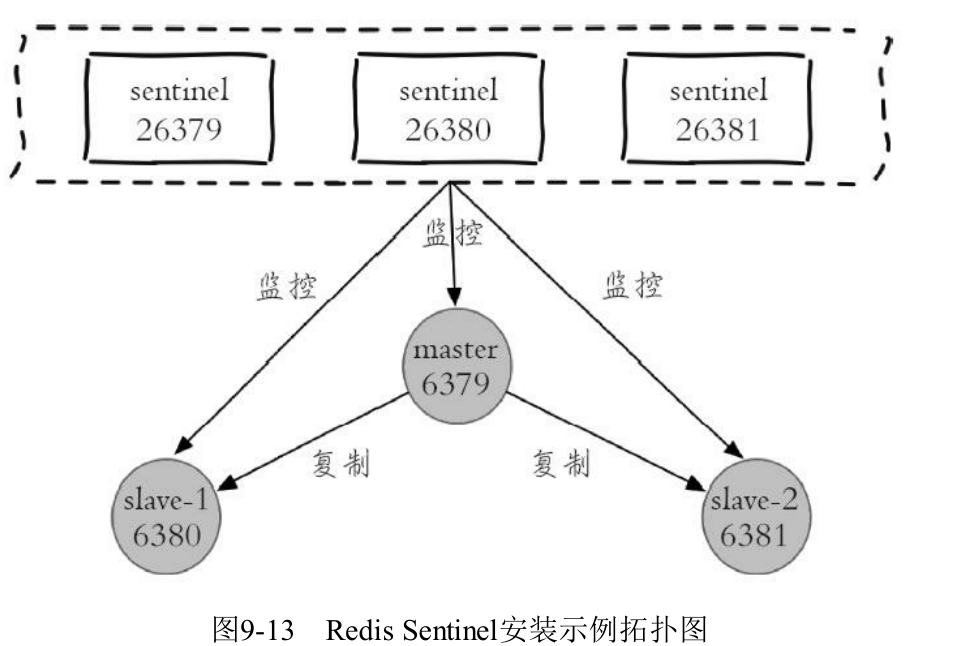
3. How to Build Redis Sentinel
- master
daemonize yes
bind 127.0.0.1
port 6379
dir "/home/user/software/redis/redis11/data"
pidfile "/home/user/software/redis/redis11/data/6379.pid"
logfile "/home/user/software/redis/redis11/log/6379.log"- Two slaves
sed "s/6379/7000/g" redis.conf > redis7000.conf
sed "s/6379/7001/g" redis.conf > redis7001.conf
echo "slaveof 127.0.0.1 6379" >> redis7000.conf
echo "slaveof 127.0.0.1 6379" >> redis7001.conf- Start master and slaves
bin/redis-server conf/redis.conf
bin/redis-server conf/redis7000.conf
bin/redis-server conf/redis7001.conf- client
- View master information
$ redis-cli -p 5000
127.0.0.1:5000> sentinel master mymaster
 1) "name"
 2) "mymaster"
 3) "ip"
 4) "127.0.0.1"
 5) "port"
 6) "6379"
 7) "runid"
 8) "953ae6a589449c13ddefaee3538d356d287f509b"
 9) "flags"
 # If the master is down, this shows o_down or s_down
10) "master"
11) "link-pending-commands"
12) "0"
13) "link-refcount"
14) "1"
15) "last-ping-sent"
16) "0"
17) "last-ok-ping-reply"
18) "735"
19) "last-ping-reply"
20) "735"
21) "down-after-milliseconds"
22) "5000"
23) "info-refresh"
24) "126"
25) "role-reported"
26) "master"
27) "role-reported-time"
28) "532439"
29) "config-epoch"
30) "1"
31) "num-slaves"
# There is one replica
32) "1"
33) "num-other-sentinels"
# There are two other Sentinels
34) "2"
35) "quorum"
36) "2"
37) "failover-timeout"
38) "60000"
39) "parallel-syncs"
40) "1"
- View replica informationSENTINEL replicas mymaster- View Sentinel informationSENTINEL sentinels mymaster- Get the master address127.0.0.1:5000> SENTINEL get-master-addr-by-name mymaster
1) "127.0.0.1"
2) "6379"sentinel26379.conf- This configuration file is mainly used to record the current system state and reload it on restart.
# Listen on port 26379 by default
port 26379
daemonize yes
# pid, log, and data locations
pidfile "/home/user/software/redis/redis11/data/26379.pid"
logfile "/home/user/software/redis/redis11/log/26379.log"
dir "/mnt/c/software/linux/redis/redis11/data"
# Sentinel automatically generates some data after startup
sentinel myid 5b7a510630ed3a7d1357b8edd6f6a1da4703c870
sentinel deny-scripts-reconfig yes
sentinel config-epoch mymaster 0
sentinel leader-epoch mymaster 0
# sentinel monitor <master-group-name> <ip> <port> <quorum>
# Configure the master to monitor. There can be multiple groups.
# Only the master needs to be configured; replicas are discovered automatically.
# quorum=2 means that if two Sentinels consider the master down, the master is considered down.
sentinel monitor mymaster 127.0.0.1 6379 2
# sentinel <option_name> <master_name> <option_value>
# If the master does not reply to Sentinel with pong for more than 5 seconds, consider it down.
sentinel down-after-milliseconds mymaster 5000
sentinel failover-timeout mymaster 60000
sentinel parallel-syncs mymaster 1- Start
bin/redis-sentinel conf/sentinel26379.confsentinel27000.conf,sentinel27001.conf
sed "s/26379/27000/g" sentinel26379.conf > sentinel27000.conf
sed "s/26379/27001/g" sentinel26379.conf > sentinel27001.conf- Start
bin/redis-sentinel conf/sentinel27000.conf
bin/redis-sentinel conf/sentinel27001.conf- Kill the master to test failover
redis-cli -p 6379 DEBUG sleep 30- Check the Sentinel logs. You can see:
- Sentinel detects that the master is down and receives a
+sdownevent — subjective down. - The event is upgraded to
+odown— objective down. - The Sentinels vote for one Sentinel to perform failover.
- Sentinel performs failover.
- Sentinel detects that the master is down and receives a
4. Redis Sentinel Principles
4.1. Primary-Replica Replication
Same as Redis Replication.
4.1.1. Leader Election
Same as Redis Replication.
4.1.2. Data Synchronization
Same as Redis Replication.
4.1.3. Request Processing
Same as Redis Replication.
4.1.4. Failure Handling
4.1.4.1. Failure Detection
Sentinels ping/pong each other, and each Sentinel continuously checks the master’s status.
Once one Sentinel detects that it cannot ping the master, it tells all Sentinels. This is called subjective down.
If more than half of the Sentinels cannot ping the master, the master is considered actually down. This is called objective down.
4.1.4.2. Failure Recovery
4.1.4.2.1. slave failure
Reconnection after a slave failure is the same as Redis Replication.
4.1.4.2.2. master failure
- Sentinel leader election
- Elect a temporary leader Sentinel: all Sentinels send candidacy requests to the cluster, and a Sentinel votes for the first candidate request it receives.
- Leader election
- Elect one slave as master: exclude offline and slow-responding slaves, and select one slave based on priority rules.
- Distributed Consistency Algorithm: Raft
5. Problems with Redis Sentinel
- Write capacity is limited by a single machine.
Discussion
Sign in with GitHub to comment. Discussions are stored as GitHub Issues.View on GitHub